Every job in one place
An electrical contractor always has several jobs running at once: wiring new homes, replacing panels, adding circuits, service calls for existing customers. When the details sit in notebooks, spreadsheets and everyone's phones, jobs slip and materials never make it onto the invoice.
In Power Play Manager, each job has its stages, crew, photos, materials, tasks and history. During setup you pick the Electrical profile, and job types, checklists and equipment categories come pre-filled. You can edit them to fit your shop.
- Customers and sites, with every job done at each address
- Jobs in stages, from site survey and quote to sign-off
- Calendar and activity log showing who changed what, and when
Who goes where, in which truck
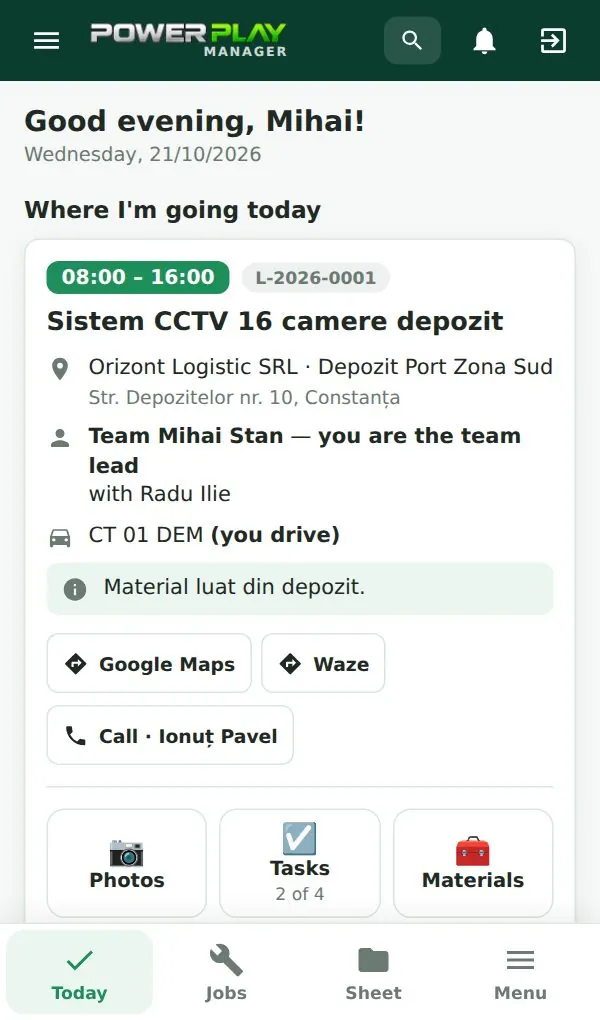
The daily plan shows crews, vehicles and the crew lead for each job. Every electrician sees a "Today" screen on their phone, and you can see who has opened the plan. Copy rows from another day when the schedule repeats, or share the plan as an image on WhatsApp.
Materials and reimbursements without lost receipts
Wire, breakers, outlets, boxes and fixtures used on a job are entered right from the phone. If someone picks up parts at the supply house on the way, they log the expense in the app and you see it when it's time to reimburse.
At the end, you know exactly what went into each job and what belongs on the invoice.
Signed worksheets and a PDF archive
When the work is done, the electrician fills in the worksheet and the customer signs on the phone. The PDF is created and emailed immediately, and every worksheet is kept in the archive. Any list in the app can be exported to PDF or Excel.
Add modules as you grow
The Start plan covers day-to-day work. When you need more, turn on extra modules.
- Site surveys before quoting: what the customer wants, measurements, photos
- Quotes on your letterhead, sent by email as PDF
- Invoices, receipts and delivery notes
- Maintenance contracts with automatically scheduled visits and checklists
- Tool inventory: who has the drill, the tester or the ladder, with hand-over history
- Fleet: inspection, insurance and service deadlines with alerts
Pricing, hosting and first steps
Plans start at €69 per month (excl. VAT) for Start, with 5 users. The app can be hosted by us, with nothing to install and a 7-day free trial, or installed at your company with a one-time license.
Start with the free demo. Then we set up your logo, company details and team accounts, and import your customers from Excel. After about two hours of online training, your team works in the app from the next day. The interface is available in English and Romanian.
Frequently asked questions
Does it make sense for a contractor with only 3 or 4 electricians?
Yes. The Start plan includes 5 users, enough for the owner and a small crew. When you hire, you add users one at a time without changing plans.
How do I track materials per job?
Electricians log the materials they use from their phone, on the job they are working on. Purchases made in the field are entered as expenses to reimburse. You see everything on the job and can export it to Excel or PDF.
Can I send quotes and invoices from the app?
Yes, with the quotes and invoicing modules. Quotes are printed on your company letterhead as a PDF and emailed to the customer. Invoices, receipts and delivery notes are handled in the same place.
What happens to my data if I stop using it?
With the hosted subscription, you can export your data to Excel at any time. Backups run daily and a copy is also kept outside the server. If you prefer, you can choose the license installed on your own computer.
Where can I see the app?
Go to demo.powerplay.ro and log in with user demo and password demo. All the data there is made up, and you can switch the interface to English.